

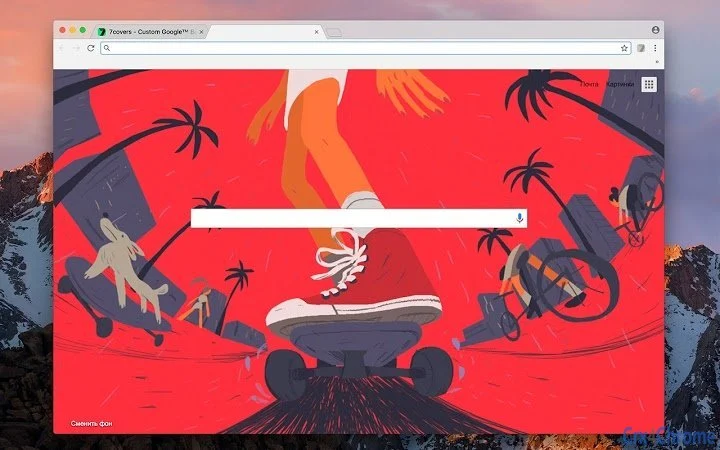
Description
Personalize Your Chrome Homepage with Dynamic Media
Overview
The software is a browser extension designed for Google Chrome, enabling users to transform their homepage into a dynamic, personalized space. It allows individuals to upload images and GIFs from their local device, the web, or Flickr, offering a creative way to customize their browsing experience. The core purpose is to replace the default homepage with visually engaging content, enhancing both aesthetics and user engagement. This tool is ideal for casual users and digital enthusiasts who value visual variety and personal expression in their daily online routines.
Users can set background colors, add custom visuals, and manage a collection of media, removing items that no longer suit their preferences. The extension supports both static images and animated GIFs, allowing for a more immersive and entertaining homepage. While the developer did not provide additional details about the development background, the extension’s functionality suggests a focus on user-driven customization and simplicity. Real-world scenarios include using it to display motivational quotes, favorite artwork, or playful animations during daily browsing sessions.
Key Features & Capabilities
- Media Upload from Multiple Sources – Users can import images and GIFs directly from their local PC, web links, or Flickr, offering flexibility in content selection.
- Custom Background Color Option – A built-in feature allows setting a solid background color, providing a minimalist or complementary base for visual content.
- Collection Management – Users can add, view, and remove media from their personal collection, enabling easy curation of preferred visuals.
- Dynamic Homepage Display – The extension replaces the default homepage with a customizable interface, supporting both static and animated media for visual variety.
- Advanced Settings for Chrome Homepage – Offers deeper configuration options to fine-tune how media is displayed and updated.
These features empower users to create a unique browsing environment. For example, someone might use it to showcase a rotating gallery of travel photos or set a playful GIF as their daily reminder. The ability to manage a personal media library ensures long-term usability, while the support for animated content adds a layer of interactivity. The extension’s design emphasizes ease of use and visual experimentation, encouraging users to explore different themes and styles without technical barriers.
User Interface, Workflow & Performance
The user interface is designed to be intuitive, with a streamlined workflow focused on media customization. The extension’s settings panel provides clear access to upload options, collection management, and advanced configurations. Navigation is straightforward, allowing users to quickly add new content or adjust their current homepage appearance. The interface appears to be lightweight, minimizing distractions and focusing on core functionality.
Performance details were not specified by the developer. However, based on general behavior of similar extensions, the impact on browser performance is expected to be minimal. The extension does not appear to require significant system resources, and its lightweight nature suggests stable operation even during extended browsing sessions. The developer did not specify resource usage details, so actual CPU or RAM behavior remains unknown. Stability is assumed to be consistent with standard Chrome extensions, though real-world testing is required for confirmation.
Compatibility & System Requirements
The extension is compatible with Windows, Mac, and Linux operating systems, making it accessible across major desktop platforms. It is designed specifically for Google Chrome, ensuring seamless integration with the browser’s ecosystem. The installation size is 1.2 MB, indicating a lightweight footprint that should not significantly affect system storage.
Exact system requirements were not listed. The developer did not provide additional hardware or software specifications. Compatibility information is limited to the supported operating systems and browser. Users should ensure they are running a current version of Chrome to access all features. No additional dependencies were mentioned.
Pros and Cons
Pros
- Supports multiple media sources including local files, web links, and Flickr
- Allows customization with background colors and personal media collections
- Lightweight design with a small installation size of 1.2 MB
- Offers advanced settings for fine-tuning the homepage experience
- Free to use with no cost barrier for access
Cons
- Developer information is not available
- Performance and resource usage details were not provided
- Compatibility with older Chrome versions is not confirmed
- Limited to Google Chrome; no support for other browsers
- No built-in media library or content suggestions
FAQ Section
Is this extension compatible with all versions of Google Chrome?
Compatibility is confirmed for current versions of Google Chrome. Support for older versions was not specified by the developer.
Is the software safe to use?
The extension is available through the Chrome Web Store and adheres to standard browser security practices. No security risks were reported.
Can I update the extension automatically?
Yes, Chrome handles automatic updates for installed extensions, ensuring users always have the latest version.
What type of license does this software use?
The software is free to use and distributed under a no-cost license, with no restrictions on personal or non-commercial use.
Can I use this extension offline?
Yes, once installed, the extension functions offline as long as the media content is already cached or stored locally.
Final Thoughts
This Chrome extension delivers a simple yet effective way to personalize the browser homepage with dynamic visuals. Its ability to integrate images and GIFs from multiple sources, combined with collection management and background customization, makes it a valuable tool for users seeking a more engaging browsing experience. While some details like performance metrics and developer background are missing, the extension’s lightweight design and free access enhance its appeal. It is best suited for casual users and digital creatives who enjoy experimenting with visual content. The lack of cross-browser support is a limitation, but for Chrome users, it offers a practical and enjoyable customization option.
Download Personalize Your Chrome Homepage with Dynamic Media now
Guides & Tutorials for 7Covers Extension for Chrome
How to install 7Covers Extension for Chrome
- Click the Preview / Download button above.
- Once redirected, accept the terms and click Install.
- Wait for the 7Covers Extension for Chrome download to finish on your device.
How to use 7Covers Extension for Chrome
This software is primarily used for its core features described above. Open the app after installation to explore its capabilities.
User Reviews for 7Covers Extension for Chrome 0
No reviews found





